
TiePaper

A modern take on PaperClip II, for Linux and Windows

A word processor where you type plain text and the screen shows exactly what you typed. The layout lives in the text, on lines that start with a checkmark, and happens when you preview or print. Fast, all from the keyboard, and very good with tables.

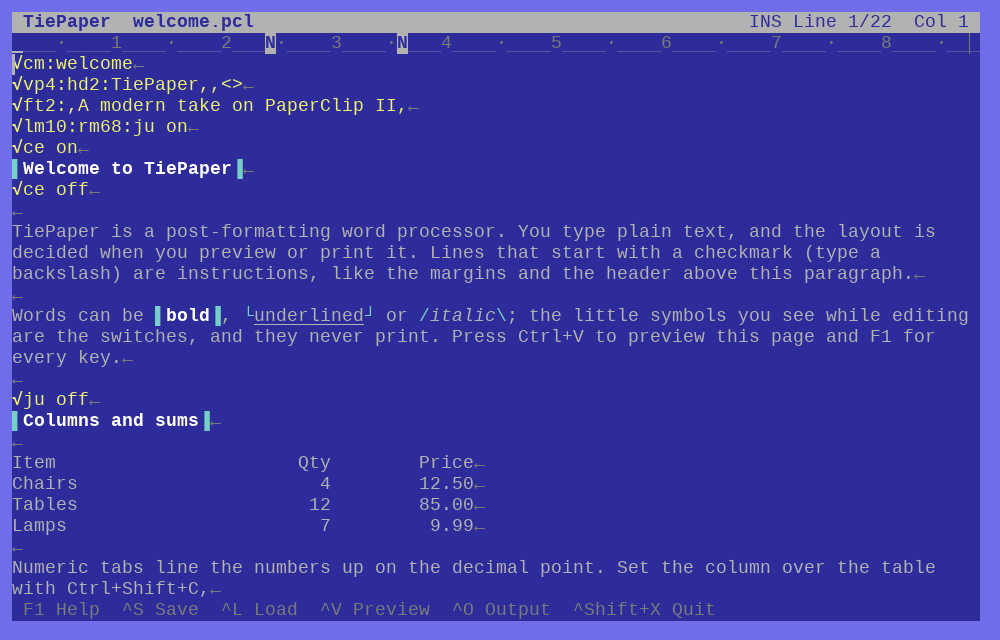
The TiePaper editing screen in blue and light blue: format lines starting with a checkmark in yellow, a heading between two cyan bars, paragraphs of plain text, a small table of items, quantities and prices, and a row of key hints at the bottom.

The welcome document, as you edit it. The yellow lines are layout instructions, and the little symbols are the switches for bold, underline and italics.

How it works

Type first. Lay it out later.

TiePaper is a post-formatting word processor, the way PaperClip II was on the Commodore 128 and 64. There is no hidden markup and no moving text under your fingers. You see what you typed, and the page appears when you ask for it.

1
Type

Write plain text. A line that starts with a checkmark is an instruction, such as margins, justification, a header or a footer. Type a backslash at the start of a line to get the checkmark.

2
Preview

Press Ctrl+V to see the formatted pages on screen, with page breaks, headers and page numbers where they will fall. Press Enter to jump back to the spot you are editing.

3
Output

Press Ctrl+O to send the pages to a PDF, a plain text file or your system printer.

✓lm10:rm70:ju on
✓vp4:hd2:My Report,,<>
✓ft2:,,Page <>
Type your text here. Paragraphs end where you press Return.

A first document: margins at 10 and 70, justified, a title in the header and the page number in the footer.

The preview is the page

Preview shows the finished layout: margins, justified text, bold, underline and italics, headers and footers, and page numbers. Zoom in, step through the pages, and drop back into the editor at exactly the line you were looking at.

When the preview is right, the output matches it.
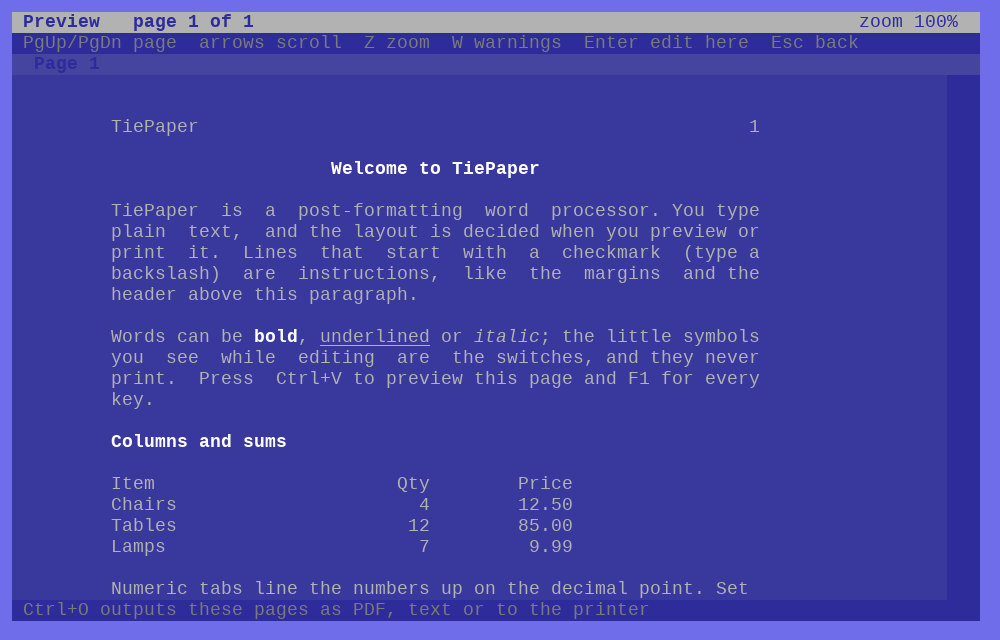
The TiePaper print preview of page 1 of 1: a centred bold heading, justified paragraphs with bold, underlined and italic words, and the table of chairs, tables and lamps lined up on the decimal point.

Columns and sums

Tables that line up and add up.

This is where PaperClip II shone, and TiePaper keeps all of it.

Work on a column

  • Move, shift, repeat, insert, delete and erase a column
  • Add a column, with 38-digit arithmetic
  • Sort by up to 16 fields

Numeric tabs

Numbers line up on the decimal point, whatever their length, so prices and quantities read straight down the page, in the editor and in the printout.

New in TiePaper

The old way of working, with today’s conveniences.

PDF, text or paper

Output goes to a PDF for printing and sharing, to plain text, or to your system printer. From the command line, tiepaper --pdf in out.pdf formats a document with no window at all.

Spell check

Ctrl+Shift+Y checks spelling through your system: hunspell, aspell or enchant on Linux, and the built-in checker on Windows.

Real text

Accents, the euro sign and curly quotes all work, in a proper TrueType font. The window resizes, and the line length follows it, or is fixed per document.

Select and edit

Select with Shift and the arrows or with the mouse: drag, double-click a word, Alt+A for everything. Then type, delete, copy, or make it bold. Undo and redo, and the system clipboard.

Live bold, italics, underline

They show as you edit, on Alt+B, Alt+I and Alt+U, and in the preview colours you choose, as on the C64.

Safe saving

TiePaper asks before it throws changes away, and saves through a temporary file, keeping a .bak of the one before.

Faithful to the original

Everything you remember from PaperClip II.

Press F1 for the key reference built in. The key bindings follow the original manual, and where a key only existed on a Commodore keyboard, a PC key stands in for it.

  • Format lines, embedded print marks, headers, footers, page and chapter numbers, forced paging
  • The tap-or-hold Control command keys: hold Ctrl and press, or tap Ctrl and then press
  • Line ranges (set, transfer, copy, delete, erase, save), phrases, and 52 instant phrases
  • Find, hunt, and search and replace with up to five pairs and wild cards, across linked files
  • Linked files, table-of-contents files and unformat
  • The tab line, a ruler that doubles as the prompt line, and the status line
  • A screen options menu with the C64 colours

What it leaves out

SpellPack’s own dictionary (spelling uses the system checker), form letters and mail merge, telecommunications, disk-drive commands, sequential data files and printer files. Output goes through PDF instead.

Get TiePaper

Free, for Linux and Windows.

TiePaper is an early version, 0.1.1. It has been driven headlessly on Linux and under Wine, but not yet tried on a real Windows machine, so reports are welcome.

Linux

One AppImage (6.6 MB) with everything it needs inside. Make it executable, then run it.

Download for Linux

Windows

A 64-bit program with a setup (2.5 MB). The setup is not code-signed, so Windows may ask you to confirm. The text may look soft at display scaling above 100%.

Download for Windows

Source

Build it yourself with Free Pascal 3.2.2. The code, the notes and the key reference are on GitHub.

See it on GitHub

The downloads come from GitHub, where the latest release is always listed.